Create a SQL Server Database with SQLOPS

UPDATE: SQL Operations Studio (SQLOPS) has since been renamed to Azure Data Studio. The steps in this article remain the same though. In any case, I’ve also rewritten these steps (and included the equivalent screenshots) specifically for Azure Data Studio . See Create a SQL Server Database with Azure Data Studio.

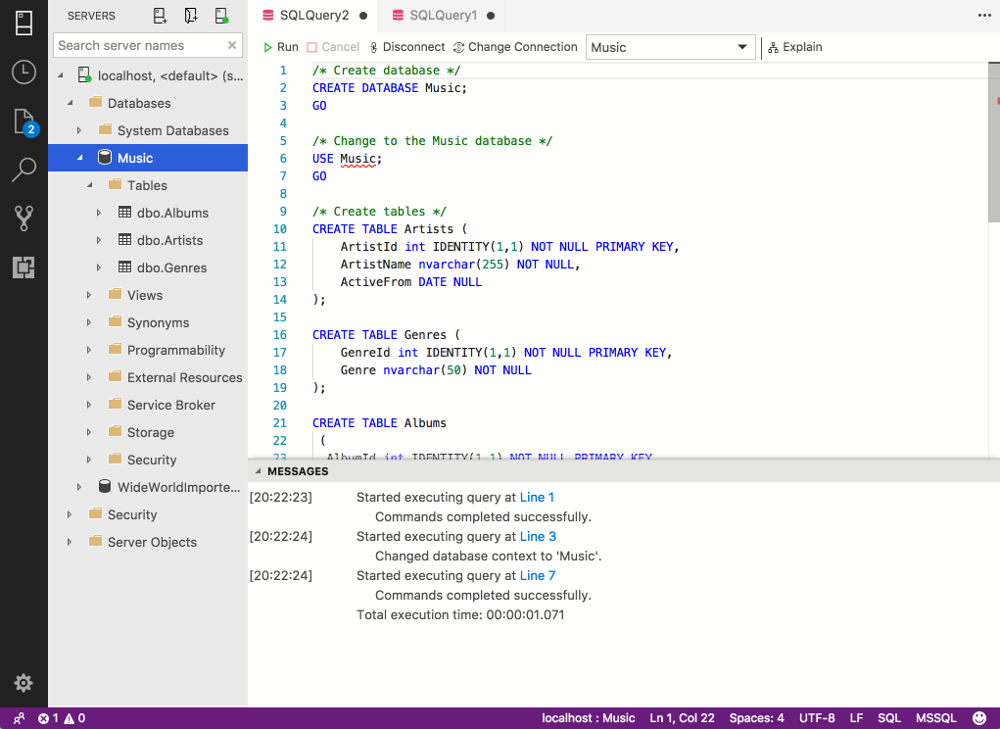
Here, I explain how to use SQL Operations Studio (SQLOPS) to create a database in SQL Server.

In my case, I’m running SQL Server on a Mac (via a Docker container), but these instructions are generic and should work exactly the same way on Linux and Windows.

This tutorial assumes you already have SQLOPS installed on your machine, and you’ve connected to your SQL Server instance. If you don’t have SQLOPS installed on your machine, here are instructions for installing it on a Mac and connecting to SQL Server via Docker.  The SQLOPS installation is pretty straightforward (you install it just like any other software), so if you’re on Linux or Windows, you shouldn’t have any issues.

Read more

How to Install SQLOPS on a Mac

UPDATE: SQL Operations Studio (SQLOPS) has since been renamed to Azure Data Studio. The steps in this article remain the same though. In any case, I’ve also rewritten these steps (and included the equivalent screenshots) specifically for Azure Data Studio . See How to Install Azure Data Studio on a Mac.

SQL Operations Studio (also abbreviated to SQLOPS) is a free tool that you can use to manage SQL Server. It uses a graphical user interface (GUI) that helps you view the various databases and objects within a SQL Server instance. It can run on Windows, macOS, and Linux, and it’s also designed to be used with Azure SQL Database, and Azure SQL Data Warehouse.

Here I explain how to install SQLOPS onto a Mac, then how to use it to connect to SQL Server.

Read more

What is the Third Manifesto?

The Third Manifesto is a detailed proposal for the future direction of data and database management systems (DBMSs).

Written by C.J. Date and Hugh Darwen, The Third Manifesto can be viewed as a blueprint for the design of future DBMSs, as well as any language designed to interface with them.

Read more

How to Install SQL Server on a Mac

Here I’ll show you how to get SQL Server up and running on your Mac in less than half an hour. And the best part is, you’ll have SQL Server running locally without needing any virtualization software.

Back in the old days (prior to SQL Server 2017), if you wanted to run SQL Server on your Mac, you first had to create a virtual machine (using VirtualBox, Parallels Desktop, VMware Fusion, or Bootcamp), then install Windows onto that VM, then finally SQL Server. This is still a valid option depending on your requirements (here’s how to install SQL Server on a Mac with VirtualBox if you’d like to try that method).

But these days you can now install SQL Server directly on to a Linux machine. And because macOS is Unix based (and Linux is Unix based), you can run SQL Server for Linux on your Mac. The way to do this is to run SQL Server on Docker.

Read more
What is a Document Store Database?

A document store database (also known as a document-oriented database, aggregate database, or simply document store or document database) is a database that uses a document-oriented model to store data.

Document store databases store each record and its associated data within a single document. Each document contains semi-structured data that can be queried against using various query and analytics tools of the DBMS.

Read more