To view MySQL status and system variables via MySQL Workbench, click on Status and System Variables under the Management tab in the left navigation pane.
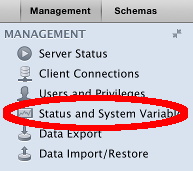
This launches the Status and System Variables screen.
Database Management Systems
To view MySQL status and system variables via MySQL Workbench, click on Status and System Variables under the Management tab in the left navigation pane.
This launches the Status and System Variables screen.
To check user privileges in MySQL Workbench, click Users and Privileges on the Management tab of the left navigation pane:
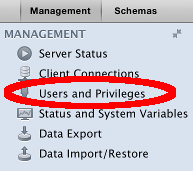
This opens the Users and Privileges screen on the Login tab.
You can use MySQL Workbench to view current connections in MySQL either by query or by GUI.
Screenshots below.
To check the status of a MySQL server using the MySQL Workbench GUI:
The Server Status window will appear, displaying the server’s status and related information:
MySQL Workbench is a graphical tool for working with MySQL.
MySQL Workbench provides an easy to use interface for performing the many tasks involved when working with databases. It integrates SQL development, administration, database design, creation and maintenance into one visual integrated development environment.
MySQL Workbench is similar to SQL Server’s SSMS, which is used for administering SQL Server.
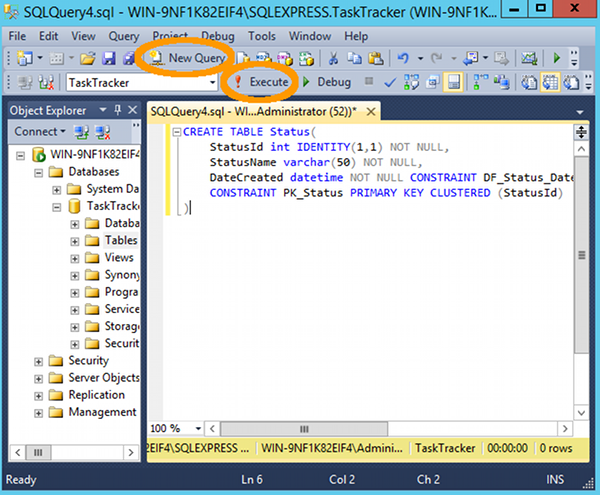
To create a table in SQL Server using a query:
CREATE TABLE script (example below)Here’s an example:
To use the Query Designer in SQL Server:
The query will appear in the query window. To run the query, click ! Execute or press F5
Below are screenshots for the above steps.
To create a view in SQL Server:
The view will now be created in the database. You will be able to see it under the Views node in the Object Explorer.
You can now use SELECT statements against the view in future queries.
Below are screenshots of the above steps.
To create a stored procedure in SQL Server:
This will add the stored procedure to the database. You can see it under the Stored Procedures node in the Object Explorer.
Below are screenshots and more detail for the above steps.
To create a query in Access 2013 or 2016:
The results of the query will be displayed.
You also have the option of saving your query. To save the query, right-click on the query tab. click Save, and name it at the prompt.