How to Create a Database from a Script in MySQL

To create a database from a script in MySQL:

  1. Open a Query tab in MySQL Workbench
  2. Run a CREATE DATABASE or CREATE SCHEMA statement to create the database (example below)

This will create a new database.

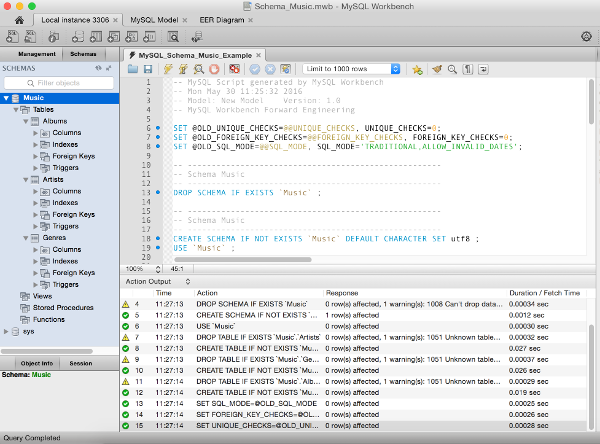
Screenshot of SQL script that creates a database in MySQL
Example of an SQL script that creates a database with tables, columns etc. In this case, the script has just run and has created the “Music” database. You can see the tables and their columns open in the left navigation pane.

Read more

How to Generate a Script from a Diagram in MySQL Workbench

To generate a script from a diagram in MySQL Workbench:

  1. Select File > Export > Forward Engineer SQL CREATE Script...
  2. Enter a location to save the file (optional) and set options to include on the script (such as DROP statements etc), then click Continue
  3. Exclude any objects by deselecting them, otherwise leave them as is, then click Continue
  4. The script is generated. You can copy it to your clipboard or click Finish to save it to a file

Read more

How to Create a New Database Diagram using MySQL Workbench

To create a new database diagram using MySQL Workbench:

  1. Click File > New Model from the menu
  2. Create a new schema by clicking the + icon next to Physical Schemas
  3. Add tables by clicking Add Tables, then add/configure their columns in the bottom pane.
  4. Create relationships and any other configurations by using the various tabs
  5. Create a diagram by clicking Model > Create Diagram from Catalog Objects

The diagram will be created. You can rearrange the tables to a more suitable layout by clicking and dragging.

Read more

What is MySQL Workbench?

MySQL Workbench is a graphical tool for working with MySQL.

MySQL Workbench provides an easy to use interface for performing the many tasks involved when working with databases. It integrates SQL development, administration, database design, creation and maintenance into one visual integrated development environment.

MySQL Workbench is similar to SQL Server’s SSMS, which is used for administering SQL Server.

Read more

How to Create a Table in SQL Server using a Query

To create a table in SQL Server using a query:

  1. In the SQL Server Management Studio, click the New Query button on the toolbar
  2. Type or paste a CREATE TABLE script (example below)
  3. Click the ! Execute button on the toolbar

Here’s an example:

Screenshot of SSMS with the New Query button highlighted.
Clicking the “New Query” button on the SSMS toolbar opens a new query. Clicking “Execute” runs the query.

Read more