Below is an alphabetical list of 121 relational database management systems (RDBMSs). Some of these could be classified under other categories, such as NoSQL databases, or object-relational. However, they are all relational to some degree.
DBMS
Database Management Systems
What is a DBMS?
DBMS stands for Database Management System.
A database management system is an application that enables the creation and administration of databases. Database management system is a broad term that includes any system that performs that function.
The most common type of DBMS is an RDBMS (Relational Database Management System). RDBMSs allow you to create relational databases – databases that have multiple tables that contain related data.
Microsoft Access Tutorial (Part 3): Queries, Forms, & Macros
This article is Part 3 of the Microsoft Access tutorial.
Here’s what’s included in this article:
- Create a query (so you can “search the database”).
- Create a form for data entry.
- Create a macro (so that a multi-step task can be done automatically – at the click of a button).
Microsoft Access Tutorial (Part 2): Design View, Field Properties, & Relationships
This article is Part 2 of the Microsoft Access tutorial.
Here’s what’s included in this article:
- Design View.
- Add field properties to a field.
- Add two more tables (for the relationship)
- Set up a relationship between three tables.
Microsoft Access Tutorial (Part 1): Databases, Tables, & Fields
This article is Part 1 of the Microsoft Access tutorial.
Here’s what’s included in this article:
- Create a database.
- Add a table to the database.
- Add four fields to the table, name/rename them, and set up their data type.
Microsoft Access Tutorial
This Microsoft Access tutorial will show you how to use Microsoft Access to create a simple database with all the common features such as tables, forms, queries, and macros.
This tutorial is for beginners. No prior database knowledge is assumed.
What is the Input Mask Wizard in Microsoft Access?
The Input Mask Wizard is a feature of Microsoft Access that helps you create an input mask.
An input mask allows you to specify exactly how data should be entered into the database. It’s an expression that specifies certain rules about how the data should be formatted as it is entered into the system.
Here’s an example of an input mask:
(999) 000-0000
This specifies the format that a phone number must be entered. The number 9 indicates an optional character. The number 0 specifies a mandatory one. So in this example, the area code is optional.
What is the Expression Builder in Microsoft Access?
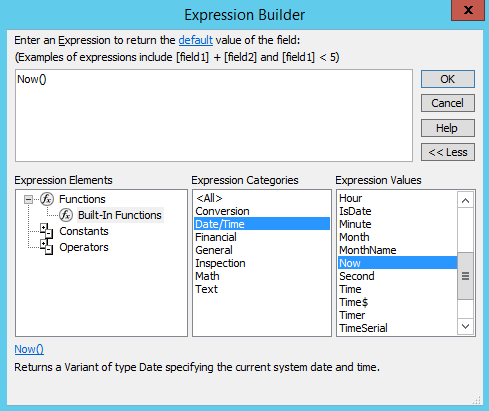
The Expression Builder is a component of Microsoft Access that helps you build expressions. It allows you to look up and build expressions without having to remember how to type the full expression.
Schema Definitions by DBMS
Different database management systems define schema in their own way. This can make it difficult for database developers to work out exactly what a schema is – especially when switching between different DBMSs.
This article provides definitions used by the three leading database systems.
What is a Database Schema?
In database terms, a schema (pronounced “skee-muh” or “skee-mah”) is the organisation and structure of a database. Both schemas and schemata can be used as plural forms.
A schema contains schema objects, which could be tables, columns, data types, views, stored procedures, relationships, primary keys, foreign keys, etc.
A database schema can be represented in a visual diagram, which shows the database objects and their relationship with each other.
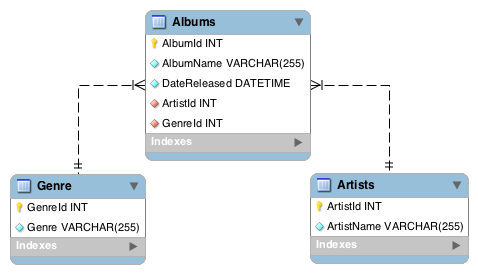
Above is a simple example of a schema diagram. It shows three tables, along with their data types, relationships between the tables, as well as their primary keys and foreign keys.