SQL CREATE TABLE Syntax – Listed by DBMS

This article contains the SQL CREATE TABLE syntax, as implemented by various database management systems (DBMSs). The syntax is listed exactly as each vendor has listed it on their website. Click on the applicable link to view more detail about the syntax for a particular vendor.

The DBMSs covered are MySQL, SQL Server, PostgreSQL, and Oracle Database.
Read more

SQL CREATE DATABASE Syntax – Listed by DBMS

This article contains the SQL CREATE DATABASE syntax, as implemented by various database management systems (DBMSs). The syntax is listed exactly as each vendor has listed it on their website. Click on the applicable link to view more detail about the syntax for a particular vendor.

The DBMSs covered are MySQL, SQL Server, PostgreSQL, and Oracle Database.
Read more

Microsoft Access Tutorial

This Microsoft Access tutorial will show you how to use Microsoft Access to create a simple database with all the common features such as tables, forms, queries, and macros.

This tutorial is for beginners. No prior database knowledge is assumed.

Read more

What is the Input Mask Wizard in Microsoft Access?

The Input Mask Wizard is a feature of Microsoft Access that helps you create an input mask.

An input mask allows you to specify exactly how data should be entered into the database. It’s an expression that specifies certain rules about how the data should be formatted as it is entered into the system.

Here’s an example of an input mask:

(999) 000-0000

This specifies the format that a phone number must be entered. The number 9 indicates an optional character. The number 0 specifies a mandatory one. So in this example, the area code is optional.

Read more

What is a Database Schema?

In database terms, a schema (pronounced “skee-muh” or “skee-mah”) is the organisation and structure of a database. Both schemas and schemata can be used as plural forms.

A schema contains schema objects, which could be tables, columns, data types, views, stored procedures, relationships, primary keys, foreign keys, etc.

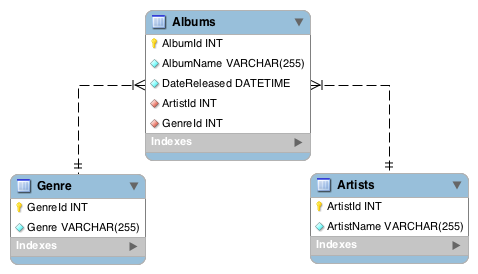
A database schema can be represented in a visual diagram, which shows the database objects and their relationship with each other.

Screenshot of a database schema.
A basic schema diagram representing a small three-table database.

Above is a simple example of a schema diagram. It shows three tables, along with their data types, relationships between the tables, as well as their primary keys and foreign keys.

Read more