In SQL Server, you can use the SET STATISTICS PROFILE statement to display the profile information for a T-SQL statement.
STATISTICS PROFILE works for ad hoc queries, views, and stored procedures.
When STATISTICS PROFILE is set to ON, each executed query returns its regular result set, followed by an additional result set that shows a profile of the query execution.
Example
Heres’s a simple example to demonstrate.
SET STATISTICS PROFILE ON;
GO

SELECT * FROM Cats c
INNER JOIN Dogs d
ON c.CatName = d.DogName;
GO
Result:
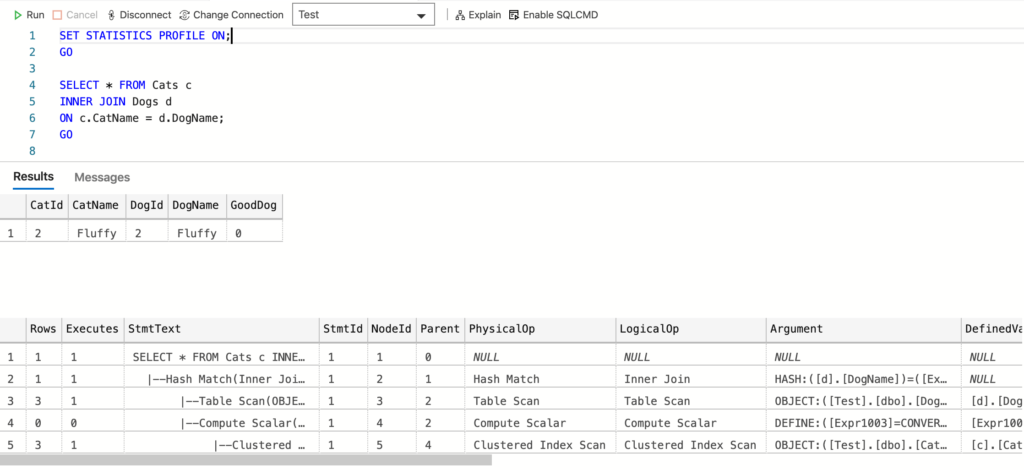
This returns the same columns that SHOWPLAN_ALL returns plus two extra (the Rows and Executes columns).
That screenshot was taken when I ran that statement in Azure Data Studio.
Here’s another simple example, this time I run a statement in mssql-cli (command line interface).
SET STATISTICS PROFILE ON;
GO

SELECT * FROM Cats;
GO
Result (using vertical output):
Commands completed successfully.
+---------+-----------+
| CatId   | CatName   |
|---------+-----------|
| 1       | Meow      |
| 2       | Fluffy    |
| 3       | Scratch   |
+---------+-----------+
(3 rows affected)
-[ RECORD 1 ]-------------------------
Rows               | 3
Executes           | 1
StmtText           | SELECT * FROM Cats
StmtId             | 1
NodeId             | 1
Parent             | 0
PhysicalOp         | NULL
LogicalOp          | NULL
Argument           | NULL
DefinedValues      | NULL
EstimateRows       | 3
EstimateIO         | NULL
EstimateCPU        | NULL
AvgRowSize         | NULL
TotalSubtreeCost   | 0.0032853
OutputList         | NULL
Warnings           | NULL
Type               | SELECT
Parallel           | 0
EstimateExecutions | NULL
-[ RECORD 2 ]-------------------------
Rows               | 3
Executes           | 1
StmtText           |   |--Clustered Index Scan(OBJECT:([Test].[dbo].[Cats].[PK__Cats__6A1C8AFAB3EF1A8F]))
StmtId             | 1
NodeId             | 2
Parent             | 1
PhysicalOp         | Clustered Index Scan
LogicalOp          | Clustered Index Scan
Argument           | OBJECT:([Test].[dbo].[Cats].[PK__Cats__6A1C8AFAB3EF1A8F])
DefinedValues      | [Test].[dbo].[Cats].[CatId], [Test].[dbo].[Cats].[CatName]
EstimateRows       | 3
EstimateIO         | 0.003125
EstimateCPU        | 0.0001603
AvgRowSize         | 142
TotalSubtreeCost   | 0.0032853
OutputList         | [Test].[dbo].[Cats].[CatId], [Test].[dbo].[Cats].[CatName]
Warnings           | NULL
Type               | PLAN_ROW
Parallel           | 0
EstimateExecutions | 1
(2 rows affected)
Commands completed successfully.
How to Turn it Off
To turn STATISTICS PROFILE off, simply run it again using OFF instead of ON:
SET STATISTICS PROFILE OFF;
GO
Is STATISTICS PROFILE Deprecated?
Although the current documentation makes no mention of it, SET STATISTICS PROFILE appears to be scheduled for deprecation in future showplan versions.
According to this old MSDN article, SET STATISTICS PROFILE is scheduled for deprecation in future showplan versions, and it is recommended that you use SET STATISTICS XML instead.
Also, the current documentation for SET STATISTICS XML supports this:
SET STATISTICS PROFILE and SET STATISTICS XML are counterparts of each other. The former produces textual output; the latter produces XML output. In future versions of SQL Server, new query execution plan information will only be displayed through the SET STATISTICS XML statement, not the SET STATISTICS PROFILE statement.
Therefore, it probably pays to use SET STATISTICS XML instead of SET STATISTICS PROFILE where possible.