In relational databases, a snowflake schema is a variation of the star schema where dimension tables are normalized into multiple related tables. Instead of keeping all dimensional attributes in a single wide table, you break them down into a hierarchy of tables that branch out like (you guessed it) a snowflake.
It’s basically what happens when you apply database normalization principles to a star schema’s dimension tables while keeping the central fact table intact.
The Basic Structure
Like a star schema, a snowflake schema has a central fact table containing measurements and metrics. The difference is in the dimension tables.
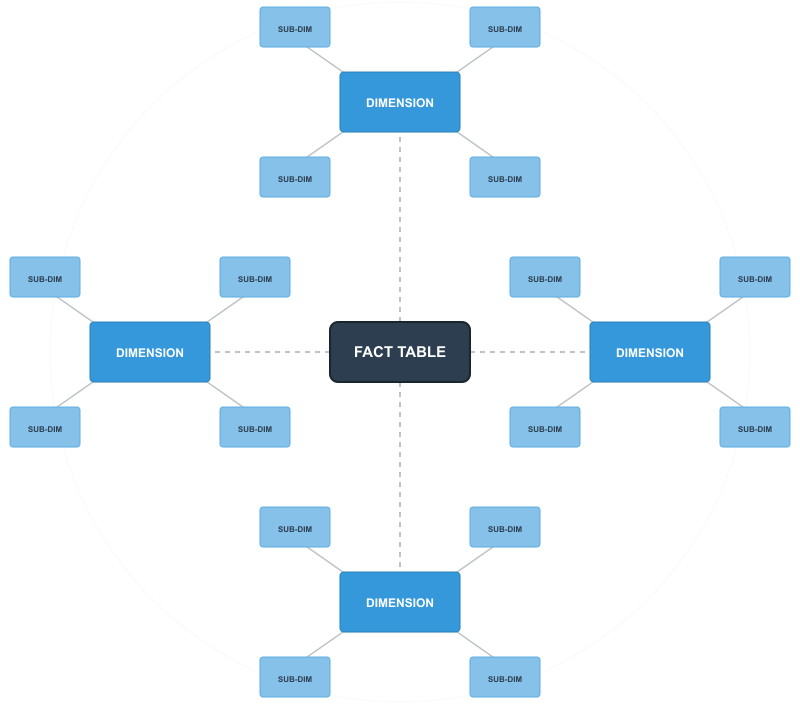
In a star schema, a product dimension might contain product name, category, subcategory, department, and brand all in one table. In a snowflake schema, you’d split this into separate tables: a product table linking to a category table, which links to a department table. Each level of the hierarchy gets its own table.
The result is a more complex structure with additional layers branching off from the fact table, creating that snowflake appearance when diagrammed.
Example
Let’s use the example of a retail environment. A star schema might simply have one large “Product” table. However, in a snowflake schema, that information would be normalized (broken down) into multiple related tables to reduce data redundancy.
Something like this:
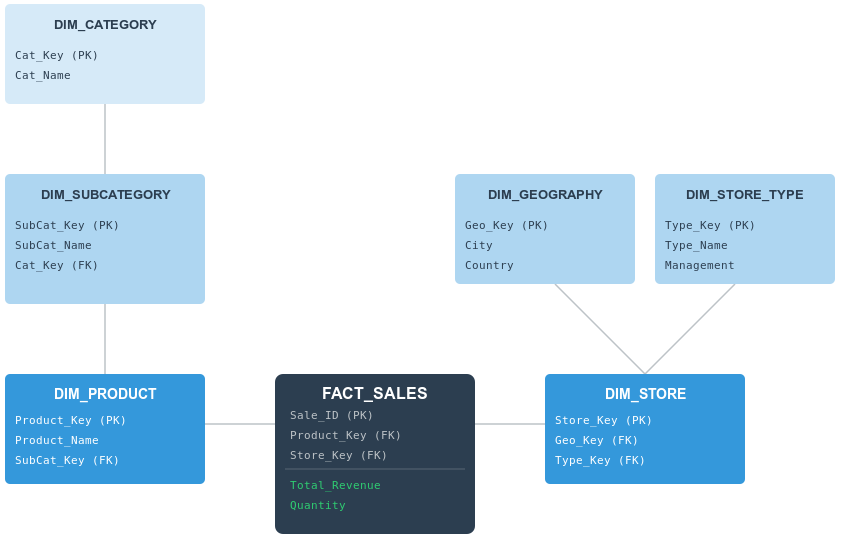
In our example, we see how a central sales event connects to increasingly specialized dimensions and sub-dimensions.
1. The Fact Table
The center of our schema remains the fact table. It stores the quantitative results of our business (in this case Total_Revenue and Quantity) alongside the foreign keys needed to link to our descriptive dimensions. Note that while the fact table is connected to many tables, it only “knows” about its immediate neighbors: DIM_PRODUCT and DIM_STORE.
2. The Product Chain
To see the “snowflake” effect in action, look at the product hierarchy on the left. In a star schema, the category name would be typed out inside the product table thousands of times. In our snowflake schema:
DIM_PRODUCTonly contains product-specific info (like the name) and a key to the sub-category.DIM_SUBCATEGORYacts as a bridge, holding its own attributes and a key to the parent category.DIM_CATEGORYsits at the outer edge, holding the high-level classifications.
This “deep” branching ensures that if a category name changes, it only needs to be updated in one single row in one single table.
3. The Store Branch
Snowflaking isn’t always a straight line; it can also be “broad”. Look at the DIM_STORE table on the right. Instead of a single chain, it branches out into two separate specialized sub-dimensions:
DIM_GEOGRAPHY: Handles all location-based data (City, Country).DIM_STORE_TYPE: Handles organizational data (like Management or Store Format).
By separating these, the database architect can manage geographic data independently from corporate management structures.
The Trade-off: Query Complexity
While this structure is highly organized and saves storage space, it comes with a “performance tax”.
To answer a simple question like, “What was the total revenue for the ‘Electronics’ category?”, the database cannot just look at two tables. It must perform a three-way join:
- Join
FACT_SALEStoDIM_PRODUCT. - Join
DIM_PRODUCTtoDIM_SUBCATEGORY. - Join
DIM_SUBCATEGORYtoDIM_CATEGORY.
This added complexity is the main reason why snowflake schemas are often preferred for specialized data warehousing where data integrity is the priority, while star schemas remain the favorite for high-speed reporting and dashboarding.
Why Normalize Dimensions?
The main benefit in normalizing the dimension data is reduced redundancy. In a star schema, if you have 10,000 products across 50 categories, you’re storing each category name 200 times on average. In a snowflake schema, you store it once.
This saves storage space. This was more of an issue when disk space was expensive.
It also makes updates easier. If a category name changes, you update one row instead of potentially thousands.
Snowflake schemas can also better represent natural hierarchies in your data. Geographic hierarchies (city → state → country), organizational structures (employee → department → division), and product taxonomies all map cleanly to normalized tables.
The Query Performance Tradeoff
But there is a catch. Normalizing the data means that queries get more complicated and potentially slower. To get product information with category and department, you now need to join three tables instead of one. Want to filter by department? That’s two additional joins compared to a star schema.
For simple queries, the performance hit might be minimal. For complex analytical queries joining multiple dimensions with deep hierarchies, it adds up. Database engines have to traverse more tables and perform more join operations.
Modern columnar databases and query optimizers handle this better than older systems, but the performance gap still exists. You’re trading storage efficiency for query complexity.
Maintenance Considerations
Snowflake schemas make certain maintenance tasks easier. When a category changes, you only need to update in one place. When you add a new level to a hierarchy, you add a new table rather than modifying existing dimension tables.
But they also add complexity to your ETL processes. Loading data requires inserting or updating records across multiple tables while maintaining referential integrity. You need to ensure that category records exist before inserting products, that department records exist before inserting categories, etc.
Also, error handling becomes more involved. A failed load might leave your dimensions in an inconsistent state across multiple tables rather than just affecting one dimension table.
When to Use a Snowflake Schema
Snowflake schemas make sense in specific situations. For example:
- When storage costs are high: If you’re working with massive dimension tables and storage is expensive or limited, the space savings can matter. This is less relevant in modern cloud environments where storage is cheap, but it can still be a factor with very large datasets.
- When dimension updates are frequent: If category names, regional boundaries, or organizational structures change often, updating one record instead of thousands reduces the workload and maintains consistency more easily.
- When hierarchies are deep and complex: If your dimensions have multiple levels that need to be maintained independently, normalized tables can make the structure clearer and more manageable.
- When you need strict data integrity: The normalization ensures that hierarchical relationships are enforced at the database level. You can’t accidentally have products with invalid categories or categories with invalid departments.
You probably don’t want a snowflake schema if query performance is your top priority, if your BI users need simple self-service access, or if your dimensions are relatively small and stable. In those cases, the complexity isn’t worth the benefits.
Star vs Snowflake
Most data warehouses lean toward star schemas because query simplicity and performance usually outweigh storage concerns. But it’s not always one or the other.
Many systems use a hybrid approach, keeping some dimensions as flat star schema tables while normalizing others that are particularly large or hierarchical. You might snowflake your geographic dimension because it has clear city-state-country hierarchies, while keeping your product dimension flat because it’s frequently queried and relatively small.
The choice depends on your specific data, query patterns, and what matters most to your users. Start with a star schema for simplicity, then normalize specific dimensions if you have a clear reason to do so.