There are 3 types of relationships in relational database design. They are:
- One-to-One
- One-to-Many (or Many-to-One)
- Many-to-Many
There are 3 types of relationships in relational database design. They are:
To create a database in the MySQL Workbench GUI:
The database will now be created, and a message will display advising that the script was successful.
To create a table in the MySQL Workbench GUI:
The table will now be created, and a message will display advising that the script was successful.
To create a table in SQL Server using the GUI:
The table will appear in the Object Explorer under the Tables icon for the applicable database.
To create a database in SQL Server using the GUI:
Once you’ve created the database, you can create tables and other database objects. You can also modify any database properties as required.
To create a table in Microsoft Access 2013 or 2016:
Here’s what that button looks like on the Ribbon:
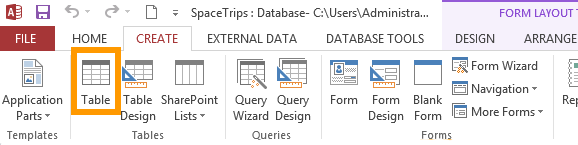
Those two steps create a blank table.
Once you’ve created your table, you will need to add fields (these will contain the data). You will also need to specify the type of data that the fields will contain (eg, text, number, date, etc).
You can also add extra rules about the type of data that can be entered into each field (eg, that phone numbers should be entered this way, dates should be entered that way, etc), as well as other properties for each field.
In Microsoft Access 2013 & 2016, you can create a database straight from the Welcome screen or from the work area. You can create either a blank database, or a database from a template.
When you first open Access, the Welcome screen is displayed. You can create your database straight from here.
Your new database will have one table called “Table1”. You can modify this table to your needs. You can also create new tables and other database objects.