The Netflix sample database is a sample database that can be used for learning and practicing SQL. It uses data from the Netflix Engagement Report and the Netflix Global Top 10 weekly list.
This guide covers the installation process and gets you running queries quickly. For more background on what this database is and why it’s useful for learning, see my introduction to the Netflix sample database.
1. Download the Script
The first step is to grab the SQL Server installation script from the GitHub repository:
https://github.com/lerocha/netflixdb/releases
For SQL Server, the file will probably be called something like netflixdb-sqlserver.zip. Unzip this file to get the .sql file (which will probably be called netflixdb-sqlserver.sql).
The scripts are updated regularly with the latest data, so you can repeat the process later, if you need more up-to-date data.
2. Create Your Database
Open your favorite database client (such as SSMS or VS Code) and connect to your SQL Server instance. Create a new database for the Netflix data:
CREATE DATABASE NetflixDB;
GO

USE NetflixDB;
GO
Feel free to use a different name if you prefer. Just make sure you’re working in that database for the next step. Our USE NetflixDB command already switched us over to it, so as long as you don’t switch to another DB, you’ll be fine).
3. Run the Installation Script
This is the easy part. With your NetflixDB database selected:
- Open the script in your database client (File > Open)
- Check that the database dropdown shows
NetflixDB(confirming that you’re in the right DB) - Hit Execute or press F5 (or other button/key, depending on your database client)
The script handles everything, including creating tables, setting up relationships, and loading all the data.
Here’s what the top of the script looks like:
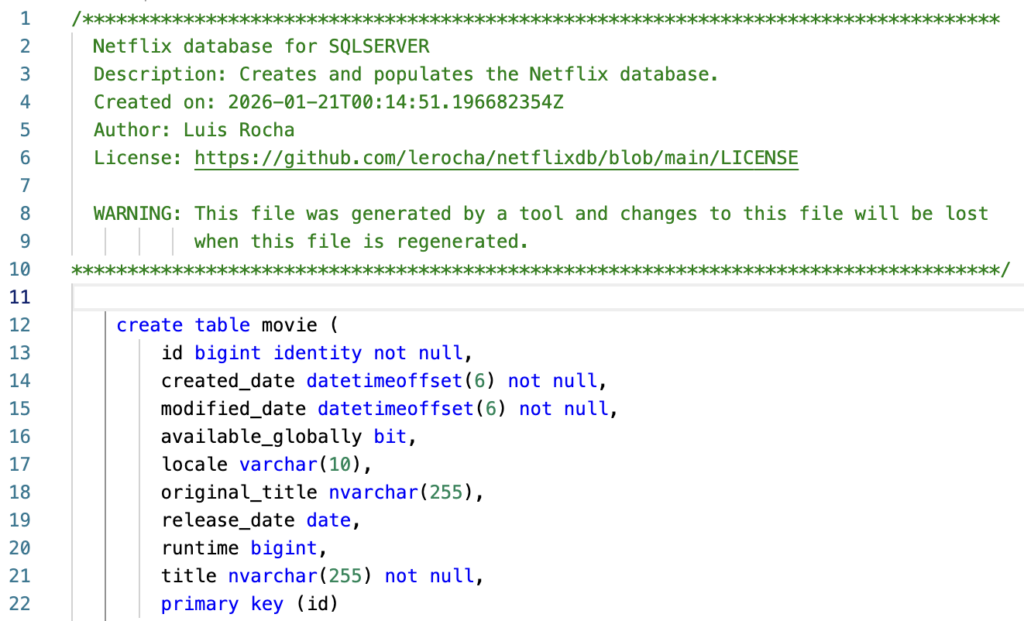
It contained 16,745 lines when I ran it for this article, so it could take a little while to populate all the tables (it took 38 seconds on my system).
4. Check That It Worked
Once the script finishes, verify the installation:
-- See what tables were created
SELECT TABLE_NAME
FROM INFORMATION_SCHEMA.TABLES
WHERE TABLE_TYPE = 'BASE TABLE'
ORDER BY TABLE_NAME;
You should see several tables. Here are the tables returned when I ran this (using my command line tool):
TABLE_NAME
------------
movie
season
tv_show
view_summary
Now check that they have data:
-- Get row counts for all tables
SELECT
    t.NAME AS TableName,
    p.rows AS RowCount
FROM
    sys.tables t
    INNER JOIN sys.partitions p ON t.object_id = p.object_id
WHERE
    t.is_ms_shipped = 0
    AND p.index_id IN (0,1)
ORDER BY
    t.NAME;
Here’s what the query returned on my machine:
TableName     NumberOfRows
------------  ------------
movie         11922
season        8555
tv_show       4699
view_summary  37225
Try a Query
Run a quick query to see the data:
SELECT TOP 10 title, runtime
FROM movie
ORDER BY modified_date DESC;
Result:
title                        runtime
---------------------------  -------
Despicable Me 3              90
The Boss Baby                98
Irish Wish                   94
Minions                      91
Atlas                        120
Mother of the Bride          90
The Super Mario Bros. Movie  92
Under Paris                  104
Society of the Snow          146
Lift                         107
Explore the Schema
You can try running queries like this one:
-- View all columns for a specific table
SELECT
    COLUMN_NAME,
    DATA_TYPE,
    CHARACTER_MAXIMUM_LENGTH,
    IS_NULLABLE
FROM
    INFORMATION_SCHEMA.COLUMNS
WHERE
    TABLE_NAME = 'movie'
ORDER BY
    ORDINAL_POSITION;
This returns all columns for a specific table (the movie table in this case):
COLUMN_NAME         DATA_TYPE       CHARACTER_MAXIMUM_LENGTH  IS_NULLABLE
------------------  --------------  ------------------------  -----------
id                  bigint          null                      NO
created_date        datetimeoffset  null                      NO
modified_date       datetimeoffset  null                      NO
available_globally  bit             null                      YES
locale              varchar         10                        YES
original_title      nvarchar        255                       YES
release_date        date            null                      YES
runtime             bigint          null                      YES
title               nvarchar        255                       NO
Sample Queries
Here are a couple of queries to get you started exploring the Netflix data:
Search for content by title:
-- Find TV shows containing "love"
SELECT *
FROM tv_show
WHERE Title LIKE '%love%';
Filter by release year:
-- Find everything from 2023
SELECT *
FROM movie
WHERE YEAR(ReleaseDate) = 2023
ORDER BY ReleaseDate DESC;
Don’t forget that the data is updated regularly on the Github repo, so feel free to re-run the above steps whenever you need the latest data.