The Netflix Sample Database is a learning database based on public data from Netflix’s Engagement Report and Global Top 10 lists. It’s available for several DBMSs, including SQL Server, SQLite, PostgreSQL, Oracle, and of course, MySQL. This article walks through installing it on MySQL.
For more background on this database and why it’s useful for learning SQL, check out my introduction to the Netflix Sample Database.
1. Download the Script
Head over to the Netflix Sample Database GitHub repository and download the MySQL installation package. The actual script is on the releases page at:
https://github.com/lerocha/netflixdb/releases
You’ll get a .zip file. Extract the .zip file to get the SQL script for MySQL which will be called something like netflixdb-mysql.sql). This .sql file is what we’ll use to set up the sample database.
2. Create Your Database
Connect to your MySQL server and create a new database:
CREATE DATABASE netflixdb;
USE netflixdb;
If you’re using a GUI tool like MySQL Workbench, you can create the database through the interface and then select it.
3. Run the Installation Script
Execute the SQL script to create the tables and load the data. To do this, do one of the following:
If you’re still in the MySQL client:
source path/to/netflixdb-mysql.sqlIf you’re using the MySQL command line:
mysql -u username -p netflixdb < path/to/netflixdb-mysql.sqlReplace username with your MySQL username. You’ll be prompted for your password.
If you’re using MySQL Workbench or another GUI:
Open the SQL script file and execute it.
The script creates all tables, sets up relationships, and loads the data.
4. Verify the Installation
Check that the tables were created:
SHOW TABLES;You should see the following tables:
+---------------------+
| Tables_in_netflixdb |
+---------------------+
| movie               |
| season              |
| tv_show             |
| view_summary        |
+---------------------+
Check the row counts:
SELECT 'movie' as table_name, COUNT(*) as row_count FROM movie
UNION ALL
SELECT 'season', COUNT(*) FROM season
UNION ALL
SELECT 'tv_show', COUNT(*) FROM tv_show
UNION ALL
SELECT 'view_summary', COUNT(*) FROM view_summary;
If you see data in these tables, the installation was successful. Here’s what mine looked like:
+--------------+-----------+
| table_name   | row_count |
+--------------+-----------+
| movie        |     11922 |
| season       |      8555 |
| tv_show      |      4699 |
| view_summary |     37225 |
+--------------+-----------+
Explore the Schema
The database schema looks like this:
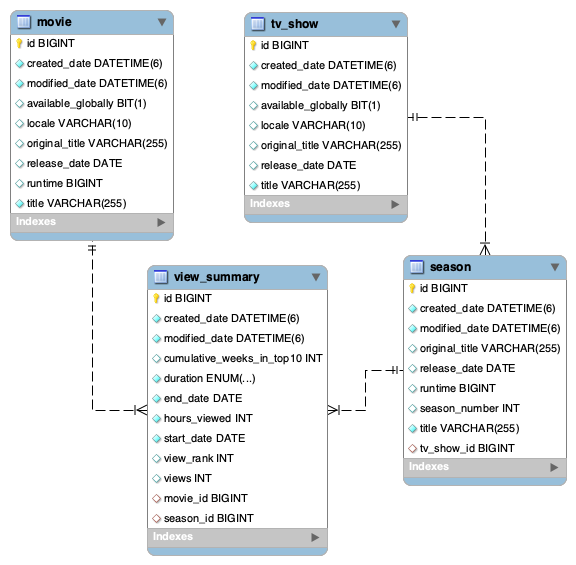
You can use the DESCRIBE statement to view the structure of the tables:
DESCRIBE movie;Output:
+--------------------+--------------+------+-----+---------+----------------+
| Field              | Type         | Null | Key | Default | Extra          |
+--------------------+--------------+------+-----+---------+----------------+
| id                 | bigint       | NO   | PRI | NULL    | auto_increment |
| created_date       | datetime(6)  | NO   |     | NULL    |                |
| modified_date      | datetime(6)  | NO   |     | NULL    |                |
| available_globally | bit(1)       | YES  |     | NULL    |                |
| locale             | varchar(10)  | YES  |     | NULL    |                |
| original_title     | varchar(255) | YES  |     | NULL    |                |
| release_date       | date         | YES  |     | NULL    |                |
| runtime            | bigint       | YES  |     | NULL    |                |
| title              | varchar(255) | NO   | MUL | NULL    |                |
+--------------------+--------------+------+-----+---------+----------------+
Run it for each table to see what columns are available. You can also use SHOW COLUMNS:
SHOW COLUMNS FROM movie;Sample Queries
Here are a few queries to verify the database is working:
Join TV shows with season data:
SELECT t.title, s.*
FROM tv_show t
JOIN season s ON t.id = s.tv_show_id
LIMIT 5;
Search for content:
SELECT title
FROM movie
WHERE title LIKE '%running%'
LIMIT 5;
The Netflix Sample Database repository is updated regularly with new data from Netflix’s public reports. You can download fresh versions of the database as needed to work with the most current information.