The Netflix Sample Database is a learning database based on public data from Netflix’s Engagement Report and Global Top 10 lists. This article walks through the steps involved when installing it on Oracle Database.
For more background on this database, check out Getting Started with the Netflix Sample Database.
1. Download the Script
Visit the Netflix Sample Database GitHub repository and grab the Oracle Database installation package. The actual script is on the releases page at:
https://github.com/lerocha/netflixdb/releases
You’ll get a .zip file. Extract the .zip file to get the SQL script for Oracle which will probably be called netflixdb-oracle.sql). This .sql file is what we’ll use to set up the sample database.
2. Prepare Your Schema
In Oracle, you work with schemas rather than separate databases. You have two options:
- Option A: Use an existing schema – If you already have a user/schema with appropriate privileges, connect to it and skip to step 3.
- Option B: Create a new schema – Connect to your Oracle Database instance as a user with administrative privileges (like SYSTEM or SYSDBA).
If you choose Option B, connect to your Oracle Database instance as a user with administrative privileges and do the following.
Create a User
For Oracle 12c and later with container databases:
If you’re using a pluggable database (PDB), connect to it first:
ALTER SESSION SET CONTAINER = your_pdb_name;Then create a local user:
CREATE USER netflixdb IDENTIFIED BY your_password;Or create a common user (must start with C##):
CREATE USER C##netflixdb IDENTIFIED BY your_password;For non-container databases or Oracle 11g and earlier:
CREATE USER netflixdb IDENTIFIED BY your_password;Grant Privileges
Then grant the necessary privileges:
GRANT CREATE SESSION TO netflixdb;
GRANT CREATE TABLE TO netflixdb;
GRANT CREATE SEQUENCE TO netflixdb;
GRANT CREATE VIEW TO netflixdb;
GRANT CREATE PROCEDURE TO netflixdb;
GRANT CONNECT, RESOURCE TO netflixdb;
GRANT UNLIMITED TABLESPACE TO netflixdb;
Connect as the new user:
CONNECT netflixdb/your_password;As mentioned, if you’re using an existing schema, simply connect to it and skip the user creation steps.
3. Execute the Installation Script
Run the SQL script to build the tables and populate them with data. How you do this will depend on your database client.
Using SQL*Plus:
@path/to/netflixdb-oracle.sqlFrom the command line:
sqlplus netflixdb/your_password @path/to/netflixdb-oracle.sqlUsing SQL Developer or another GUI:
Load the script file and run it in your query window. Here’s what the top of the script looks like:
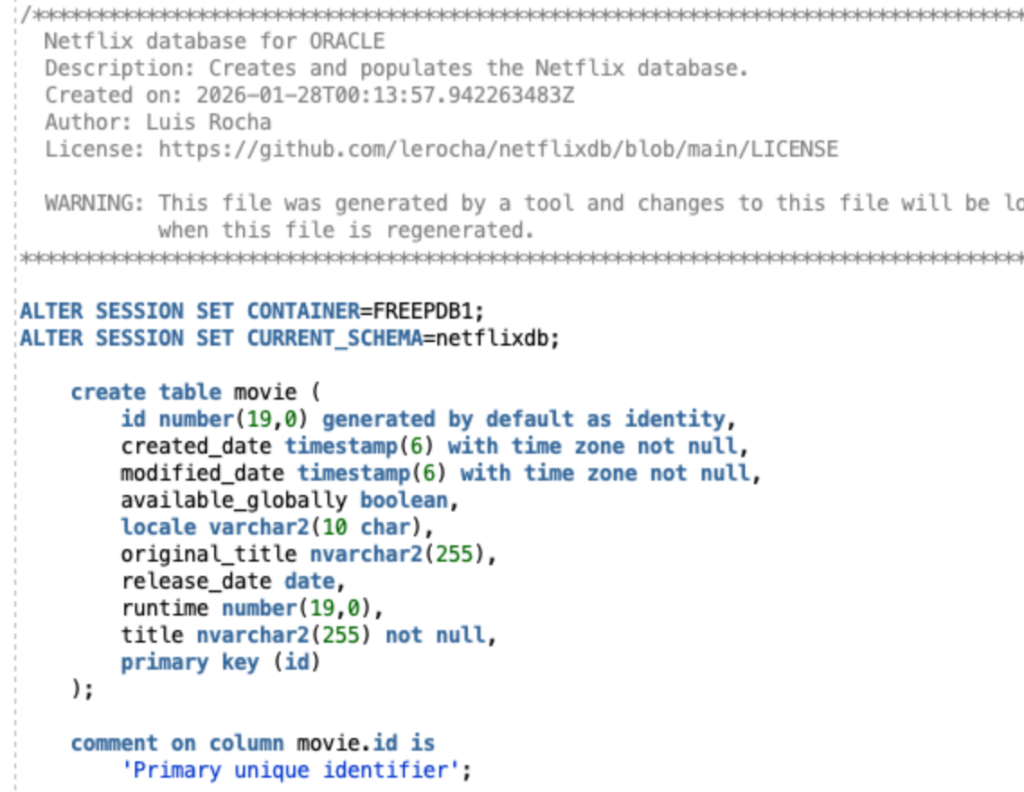
The installation process creates tables, establishes relationships, and imports all the data. Expect this to take several minutes depending on your system.
4. Verify the Installation
Confirm the tables exist:
SELECT table_name
FROM user_tables
ORDER BY table_name;
You should see:
TABLE_NAME
------------
MOVIE
SEASON
TV_SHOW
VIEW_SUMMARY
You can run the following query to check the number of rows in each table:
SELECT 'MOVIE' as table_name, COUNT(*) as row_count FROM movie
UNION ALL
SELECT 'SEASON', COUNT(*) FROM season
UNION ALL
SELECT 'TV_SHOW', COUNT(*) FROM tv_show
UNION ALL
SELECT 'VIEW_SUMMARY', COUNT(*) FROM view_summary;
If the installation was successful, all four tables will contain data. Here’s what mine returned:
TABLE_NAME    ROW_COUNT
------------ ----------
MOVIE             11934
SEASON             8565
TV_SHOW            4711
VIEW_SUMMARY      37265
Explore the Schema
View table structure:
DESCRIBE movie;Or get more detailed column information:
SELECT column_name, data_type, nullable
FROM user_tab_columns
WHERE table_name = 'MOVIE'
ORDER BY column_id;
Note that Oracle typically stores table and column names in uppercase unless they were created with quoted identifiers.
Sample Queries
A couple of queries to test the installation:
Aggregate viewing data:
SELECT COUNT(*) as total_views,
       MIN(views) as min_views,
       MAX(views) as max_views
FROM view_summary;
Find movies by title pattern:
SELECT title
FROM movie
WHERE UPPER(title) LIKE '%STRANGER%'
FETCH FIRST 5 ROWS ONLY;
If Something Goes Wrong
- Authentication issues: Double-check your username and password. Ensure the user has necessary privileges.
- Tablespace errors: The user needs tablespace quota. Grant unlimited tablespace or assign a specific quota.
- Script failures: Review the output for errors. Oracle provides detailed error messages that usually point to the specific issue.
The Netflix Sample Database repository receives regular updates with fresh data from Netflix’s public reports. You can download newer versions whenever you need updated information for your learning or testing.