If you’re getting error 3234 that reads something like “Logical file ‘AdventureWorksLT_Data’ is not part of database ‘AdventureWorksLT2025’. Use RESTORE FILELISTONLY to list the logical file names.“, you’re referencing the wrong logical file names when restoring a database.
This issue can happen when you try to map the logical file names to a new location, but you get those logical file names wrong.
Fortunately there’s an easy fix. It involves looking up the actual logical file names, then modifying your RESTORE DATABASE statement accordingly.
Example of Error
Here’s an example of code that causes the error:
RESTORE DATABASE [AdventureWorksLT2025]
FROM DISK = N'/var/opt/mssql/data/AdventureWorksLT2025.bak'
WITH
    MOVE N'AdventureWorksLT_Data' TO N'/var/opt/mssql/data/AdventureWorksLT.mdf',
    MOVE N'AdventureWorksLT_Log' TO N'/var/opt/mssql/data/AdventureWorksLT.ldf';
Output:
Msg 3234, Level 16, State 2, Line 1
Logical file 'AdventureWorksLT_Data' is not part of database 'AdventureWorksLT2025'. Use RESTORE FILELISTONLY to list the logical file names.
Msg 3013, Level 16, State 1, Line 1
RESTORE DATABASE is terminating abnormally.
Error 3234 states that the specified logical file isn’t actually part of the database that I was trying to restore. In other words, I was trying to map a non-existent logical file to a new location.
We also got error Msg 3013 as a bonus. It simply tells us that the restore process was terminated. In other words, it failed due to the previous error.
Solution
The error message told us to “Use RESTORE FILELISTONLY to list the logical file names“, so let’s do that:
RESTORE FILELISTONLY
FROM DISK = '/var/opt/mssql/data/AdventureWorksLT2025.bak';
Output:
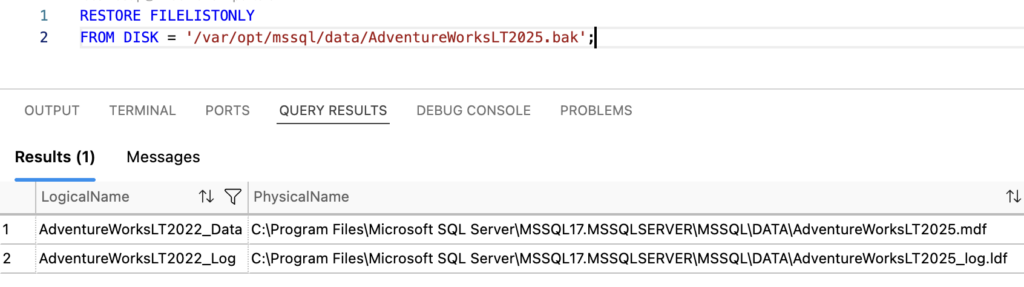
This tells us the logical file names (first column). We can see that these are different to the ones I was trying to restore to. Interestingly, they have 2022 in their names, when we’re actually installing the 2025 version. Regardless, the 2022 names are the ones to use.
Now that we know the logical file names, we can go ahead and modify our RESTORE DATABASE statement accordingly (and run it again):
RESTORE DATABASE [AdventureWorksLT2025]
FROM DISK = N'/var/opt/mssql/data/AdventureWorksLT2025.bak'
WITH
    MOVE N'AdventureWorksLT2022_Data' TO N'/var/opt/mssql/data/AdventureWorksLT.mdf',
    MOVE N'AdventureWorksLT2022_Log' TO N'/var/opt/mssql/data/AdventureWorksLT.ldf';
Output:
Processed 888 pages for database 'AdventureWorksLT2025', file 'AdventureWorksLT2022_Data' on file 1.
Processed 2 pages for database 'AdventureWorksLT2025', file 'AdventureWorksLT2022_Log' on file 1.
RESTORE DATABASE successfully processed 890 pages in 0.035 seconds (198.549 MB/sec).
Total execution time: 00:00:00.399
This time it worked. We’ve successfully fixed the 3234 error.