You may be aware of a concept called row-level security, which controls which rows a user can see in a table. Column-level security is a similar concept, controls which columns are visible. It solves a different problem. Same table, same rows, but some fields in those rows shouldn’t be visible to everyone.
Think about an employees table. A manager might reasonably see a list of all staff and their departments. But salary? National ID numbers? Personal contact details? These should be visible to the manager, but they probably shouldn’t be visible to most other employees, even if they’re querying the same table.
What Is Column-Level Security?
Column-level security (CLS) is a way of restricting access to specific columns in a database table. Instead of hiding entire rows, you’re hiding specific fields. A user might be able to run SELECT * FROM employees and get back a perfectly valid result set, just with certain columns missing or masked.
It looks something like this:
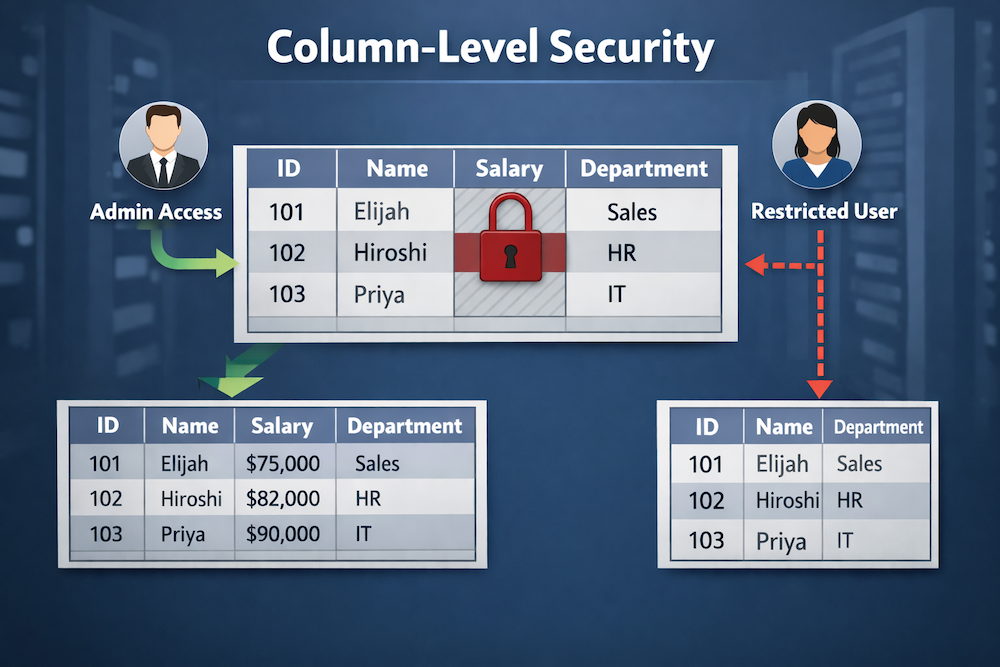
It’s basically a finer-grained layer of access control that sits on top of table-level permissions.
How It Works in Practice
Many relational databases implement column-level security by allowing privileges to be granted on specific columns rather than the entire table, although some databases may require views or other mechanisms to enforce this. So rather than granting a user access to an entire table, you grant access to specific columns only.
In PostgreSQL, it might look like this:
GRANT SELECT (id, name, department) ON employees TO hr_readonly;Here, we specify which columns the hr_readonly role can view. We didn’t include the salary column, and so it stays off-limits for that role. When a user with the hr_readonly role tries to select salary, they’ll get a permission error. The column is simply not accessible to them.
You can apply the same logic to INSERT and UPDATE as well, so users can’t write to columns they shouldn’t be touching.
For example, to grant INSERT:
GRANT INSERT (id, name, department) ON employees TO hr_editor;And for UPDATE:
GRANT UPDATE (department) ON employees TO hr_editor;Views as a CLS Pattern
Another common approach to CLS is to use views. Instead of managing column privileges directly, you create a view that only exposes the columns you want, then grant access to the view rather than the underlying table.
Example:
CREATE VIEW employees_public AS
  SELECT id, name, department
  FROM employees;

GRANT SELECT ON employees_public TO hr_readonly;
This is a bit more work upfront, but it gives you more flexibility. Views can also combine columns from multiple tables, apply formatting, or add computed fields, all while keeping the sensitive source data locked down.
Many teams prefer views specifically because the access rules are visible and easy to reason about. There’s no hunting through privilege settings because the view definition tells you exactly what’s exposed.
Common Use Cases
- Salary and compensation data: HR systems often need different visibility levels between payroll teams, managers, and general staff.
- Personally Identifiable Information (PII): Names, addresses, and ID numbers frequently need to be restricted even when other columns in the same table are broadly accessible.
- Internal pricing or margins: Sales tools might show reps a product catalog without exposing cost prices or margin percentages.
- Audit fields: Columns like
created_byorinternal_notesare sometimes useful internally but shouldn’t be surfaced to external-facing roles.
CLS vs. RLS: Which One Do You Need?
I mentioned row-level security (RLS) earlier. While CLS and RLS are similar, they’re also quite different. They solve different problems, and in many systems you need both.
For example, a multi-tenant app might use RLS to make sure each tenant only sees their own records, while CLS ensures that even within those records, sensitive fields aren’t exposed to lower-privilege roles.
They layer well together. Neither one replaces the other.
Data Masking as an Alternative
Sometimes you don’t want to block access to a column entirely. Instead, you just want to obscure the actual values. This is called data masking, and it’s worth knowing about as a related concept.
Instead of returning an error when a restricted user queries ssn, a masking rule might return ***-**-6789. The column is present, the format is intact, but the sensitive data is hidden. Some databases and third-party tools support this natively. PostgreSQL has extensions like anon that add masking capabilities on top of standard column privileges.
Masking is useful when downstream applications expect a column to be present and can’t handle it being absent entirely.
A Few Things to Keep in Mind
SELECT *is your enemy here: If application code relies on wildcard selects, it may behave unexpectedly when column permissions are in place. Explicit column lists in queries are a better habit regardless.- ORM compatibility varies: Object-relational mappers (ORMs) are libraries that let you interact with a database using your application’s programming language instead of raw SQL. Some ORMs assume they can read all columns when building models, so column restrictions can cause silent failures or errors depending on how the ORM handles missing fields.
- Views need maintenance: If you’re using views for CLS, adding new columns to the underlying table doesn’t automatically surface them in the view. You’ll need to update the view definition intentionally.
- Audit your grants regularly: Column privileges can accumulate over time as schemas evolve. It’s worth periodically reviewing who has access to what.
Where This Fits in a Broader Security Model
Column-level security works best as one part of a layered approach. It’s not a substitute for application-level validation, encryption of sensitive fields at rest, or proper authentication. But it does mean that even if something goes wrong at another layer (a misconfigured API, an overly broad service account, a careless query, etc) sensitive columns have an extra line of defense.
The goal is to make the database itself opinionated about what data is visible. Not to rely solely on every query being written perfectly.
Getting Started
If you’ve already got a working database, the easiest first step is to audit your most sensitive columns. Things like password_hash, salary, tax_id, phone_number. Then ask which roles actually need access to each one.
You may find that most roles need far fewer columns than they currently have access to.