Most developers learn about database permissions in broad strokes. You grant a user access to a table, and they can read it. Simple. But what happens when different users should only see some of the rows in that table? That’s where row-level security comes in.
What Is Row-Level Security?
Row-Level Security (RLS) is a feature that lets you control which rows in a database table a given user can see or modify. Instead of controlling access at the table level, you’re controlling it at the row level.
For example, a support agent might query the same orders table as a regional manager, but each one only gets back the rows they’re allowed to see. Or in another scenario, it could be used to filter rows by region. All users query the same table, but they can only see the regions they’re allowed to see.
So it might look something like this:
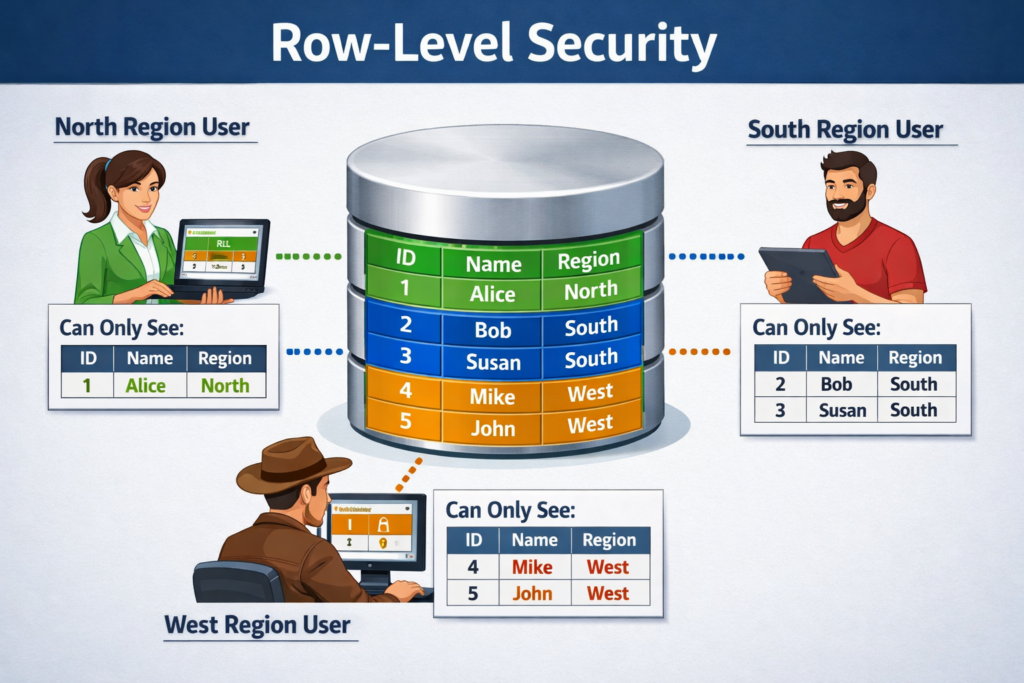
It’s kind of like a filter that runs automatically, invisibly, every time someone touches the table.
Why Not Just Handle This in Application Code?
A lot of teams do handle it in application code, at least at first. You write a query that includes a WHERE user_id = current_user condition, and it works fine. Until someone forgets to add that clause. Or writes a new endpoint. Or a bug sneaks through.
RLS moves that logic into the database itself. The access rules live right next to the data they’re protecting, and they apply regardless of how the query was written or where it came from. It’s a safety net that doesn’t depend on every developer remembering to do the right thing.
How It Actually Works
When you enable RLS on a table, the database starts checking a policy on every query against that table. A policy is just a rule that evaluates to true or false for each row. If the policy returns true, the user sees the row. If it returns false, the row is invisible to them.
Here’s a simple example in PostgreSQL:
ALTER TABLE orders ENABLE ROW LEVEL SECURITY;

CREATE POLICY orders_user ON orders
  USING (user_id = current_user_id());
With this in place, a query like SELECT * FROM orders will silently return only the rows where user_id matches the current user. No errors or warnings. Just filtered results.
The following policy allows only members of the managers role to access rows, and only rows of their accounts:
ALTER TABLE accounts ENABLE ROW LEVEL SECURITY;

CREATE POLICY accounts_managers ON accounts TO managers
    USING (manager = current_user);
Common Use Cases
RLS shows up in a lot of different contexts. A few common ones:
- Multi-tenant SaaS apps: Each customer (tenant) shares the same tables but should only see their own data.
- Role-based data access: Managers can see all records in their department. Employees only see their own.
- Compliance requirements: Healthcare and finance applications often need strict data isolation baked into the data layer.
- Audit and visibility controls: Some rows are flagged as restricted, and only certain roles can access them.
Policies Can Cover More Than Just SELECT
By default, a policy applies to all operations. But you can get more granular. For example, you might want to specify that users can read all rows in a table but only update rows they own.
PostgreSQL lets you define separate policies for SELECT, INSERT, UPDATE, and DELETE. For example:
CREATE POLICY read_all ON documents
  FOR SELECT USING (true);

CREATE POLICY edit_own ON documents
  FOR UPDATE USING (owner_id = current_user_id());
In the first statement, the keyword true means that the policy is always satisfied for every single row in the table, effectively granting unrestricted read access. In the second statement, we specify that users can only update their own rows.
This kind of granularity is hard to replicate cleanly in application code without it getting messy fast.
A Few Things to Watch Out For
RLS can be very useful, but it’s not a silver bullet. There are a few things worth keeping in mind:
- Superusers bypass RLS by default in some DBMSs: In PostgreSQL, superusers and table owners are exempt from policies unless you explicitly use
FORCE ROW LEVEL SECURITY. In SQL Server, RLS policies apply to all users (even admins) during query execution, but administrators can modify or disable the policy if they want. You should check your DBMS’s documentation to understand exactly how RLS works for different users and roles. - Performance matters: Policies add conditions to every query. Make sure your policy columns are indexed, or you may see slowdowns on large tables.
- Policies are invisible in queries: That’s a feature, but it can also make debugging confusing. If a query returns fewer rows than expected, RLS is worth checking.
- Not every database supports it: PostgreSQL has strong native RLS support. MySQL doesn’t have a built-in equivalent, so teams using MySQL typically implement this in the application layer or with views, triggers, and/or functions.
RLS in the Context of Modern Tools
If you’ve used Supabase, you’ve probably run into RLS already. Supabase enables it by default on new tables and builds its entire auth model around it. You write policies that reference the authenticated user’s JWT claims, and the database enforces access automatically. It’s a clean pattern once you get used to it.
Other tools like PostgREST also rely heavily on PostgreSQL RLS to manage access control without requiring a separate permission layer in the API. Systems like Hasura provide their own permission models at the API layer instead, though they can still be combined with database-level security features.
Is RLS Right for Your Project?
If you’re building anything where different users should see different subsets of data, RLS is worth serious consideration. It’s not always the simplest starting point, but it’s much easier to add early than to retrofit later when your codebase has scattered WHERE user_id = clauses everywhere.
Start small. Pick one table where data isolation matters. Enable RLS, write a simple policy, and test it. Once you see how it behaves, the mental model clicks pretty quickly.