If you’re learning SQL or looking for a real-world dataset to sharpen your database skills, the Netflix sample database could be an option. This free, open-source database is based on publicly available information from Netflix’s Engagement Report and Global Top 10 weekly lists, making it both relevant and engaging for practice purposes.
What Is the Netflix Sample Database?
The Netflix sample database is a community-created learning resource that contains data about movies and TV shows from Netflix’s public reporting. Created and maintained by Luis Rocha (lerocha on GitHub), this database provides a realistic dataset that mirrors the kind of information you might encounter in production environments, without the complexity of Netflix’s actual internal systems.
Here’s an ER diagram of the database:
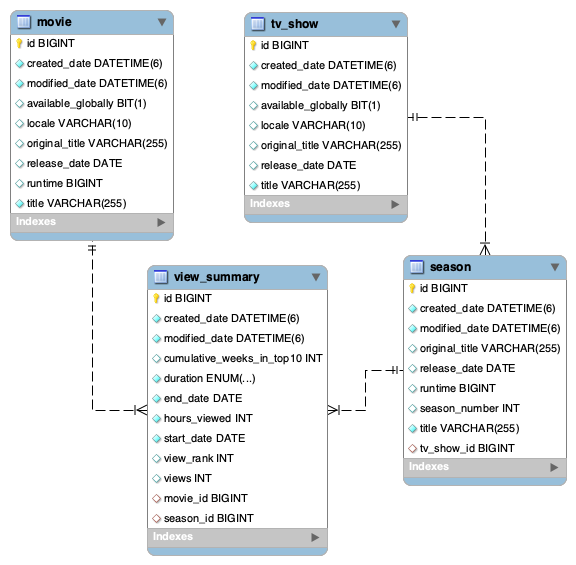
The database includes information about:
- Movies and TV shows available on Netflix
- Viewing data and engagement metrics
- Weekly rankings from Netflix’s Global Top 10 lists
- Release dates and other metadata
Unlike toy databases with just a handful of records, this dataset contains substantial real-world data that makes it perfect for learning joins, aggregations, filtering, and other SQL concepts with meaningful results.
A Great Learning Tool
The Netflix sample database can be a great tool for your SQL practice:
- Familiar Domain: Everyone knows Netflix. You don’t need specialized knowledge to understand what the data represents, allowing you to focus on learning SQL rather than deciphering unfamiliar business concepts.
- Real-World Relevance: The data comes from actual Netflix reports, giving you experience with the kind of information businesses track and analyze. This makes your practice directly applicable to real job scenarios.
- Appropriate Complexity: The database is sophisticated enough to practice advanced queries, but not so complex that it overwhelms beginners. It strikes an ideal balance for learning.
- Multiple DBMS Support: The database is available for multiple database management systems including SQL Server, MySQL, PostgreSQL, SQLite, and others, allowing you to practice across different platforms or choose the one you’re learning.
- Active Maintenance: The database is regularly updated with new data, ensuring you’re working with current information.
What’s Available
The Netflix sample database project provides installation scripts for several popular database platforms:
- SQL Server (T-SQL)
- MySQL
- PostgreSQL
- SQLite
- Oracle Database
Each version contains the same core data structure and content, with SQL scripts adapted for the specific syntax and features of each database system. This consistency makes it easy to learn concepts on one platform and transfer that knowledge to another.
Getting the Database
The Netflix sample database is hosted on GitHub and is completely free to use. The main page is here:
https://github.com/lerocha/netflixdb
And you can download the scripts from here:
https://github.com/lerocha/netflixdb/releases
The repository contains all the SQL scripts you need to create and populate the database on your chosen platform. Each script is clearly labeled for its target database system, making it straightforward to find what you need. The scripts are updated regularly with the latest data.
What You’ll Need
Before installing the database, make sure you have:
- A Database Management System: Install SQL Server, MySQL, PostgreSQL, or another supported DBMS on your computer or have access to a database server.
- A SQL Client or Tool: Most database systems come with their own tools (like SQL Server Management Studio for SQL Server, or pgAdmin for PostgreSQL), but you can also use universal tools like DBeaver or VS Code with the appropriate extensions.
- Basic SQL Knowledge: While this database is beginner-friendly, you should understand basic concepts like tables, queries, and how to execute SQL scripts in your chosen database system.
- The Installation Script: Download the appropriate SQL script from the GitHub repository for your database system.
Installation
While specific steps vary by database system, the general process is:
- Create a new database (or schema, depending on your DBMS)
- Download the appropriate SQL script from the GitHub repository
- Execute the script in your database client
- Verify the installation by running a simple query
The scripts handle everything automatically, including creating tables, defining relationships, and loading all the data. Depending on your system and the amount of data, installation typically takes just a few minutes.
Check out the following articles for installing it on your DBMS:
Then What?
Once you have the Netflix sample database installed, you’ll be able to explore the data and practice a wide range of SQL skills, such as:
- Write
SELECTqueries to retrieve specific movies or shows - Practice
JOINoperations to combine data from multiple tables - Use aggregate functions to analyze viewing trends
- Create complex filters to find content that meets specific criteria
- Build reports and summaries from the raw data
Sample databases such as the Netflix one provide a great learning environment for anyone looking to improve their SQL skills. With real-world data, appropriate complexity, and support for multiple database platforms, it offers an engaging way to move beyond simple tutorials and work with data that feels meaningful and relevant.
If you’re looking for a sample database based on real-world data, why not head over to the GitHub repository and check it out.